· 2 min read
Demo: accruals for Spendesk spend not yet in the ERP

Key takeaways
- At month-end, some costs for the closing month are still payables in Spendesk that have not reached the ERP.
- An Eagl agent lists them, looks each one up in the ERP and in the accruals, and proposes an accrual for the costs that are missing.
- The demo runs on NetSuite. Eagl works the same way with Microsoft Dynamics 365 Business Central, Exact Online and other ERPs.
- Nothing is booked until you approve it, and every step is logged on the checklist task.
At month-end, some of the costs that belong to the closing month are still payables in Spendesk. They have not reached the ERP yet, so someone has to find them, check whether they were already booked or accrued, and accrue the rest. The one-minute demo above shows how an Eagl agent does that, with NetSuite as the ERP.
What the demo shows
- The task in the close checklist. “Check Spendesk spend not yet reported to NetSuite” sits under Accounts payable in the October close for Apollo BV, with a preparer, a reviewer and due dates. You choose “Let Eagl prepare this task”.
- Three questions before the setup. Eagl first looks at Apollo BV’s books, then asks what each month’s check should produce, where to look and which costs to accrue. Here: an accrual for each missing cost, Spendesk payables checked in NetSuite, and costs over €250 that belong to the month.
- A test on last month. Eagl runs the check on September first. It checks out: the 3 payables that were not reported to NetSuite by 30 September were all accrued.
- A draft routine. “Accrue Spendesk spend not yet in NetSuite” runs on the task’s due date. Its instructions are written out: list the Spendesk payables for the month that are not in NetSuite yet, look each one up in NetSuite and in the accruals, propose an accrual on 444000 for costs over €250 that are neither booked nor accrued, and set the task to Ready for Review. You can edit it before you turn it on.
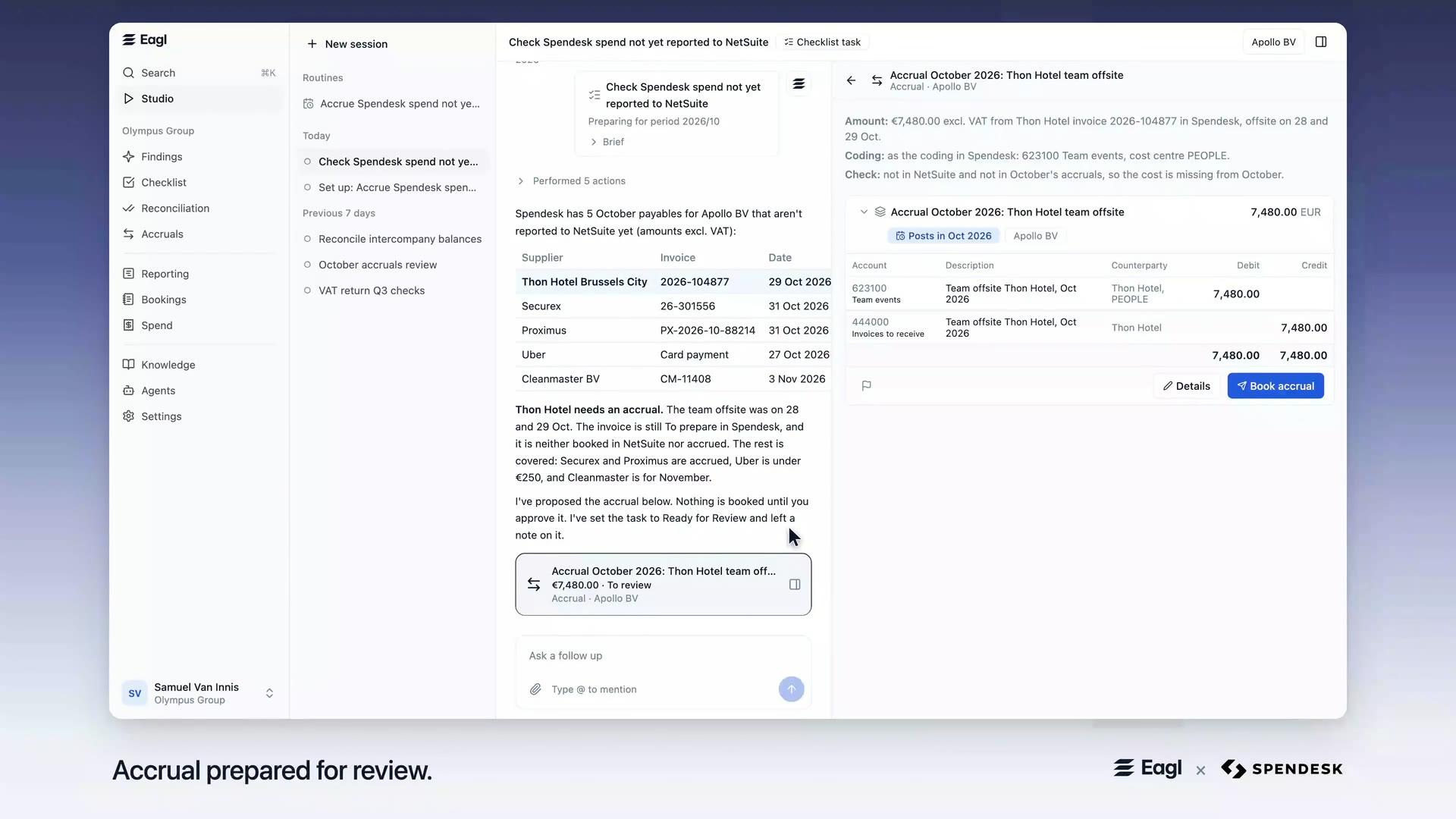
- The agent runs on the due date. On 5 November it finds 5 October payables in Spendesk that are not in NetSuite yet. Securex and Proximus are already accrued, the Uber card payment is under €250 and the Cleanmaster BV invoice is for November service. One cost is missing: the Thon Hotel team offsite of €7,480.00 on 28 and 29 October, still waiting in Spendesk.
- The accrual, ready for review. Eagl proposes the entry with the coding from Spendesk (debit 623100 Team events, cost centre PEOPLE, credit 444000 Invoices to receive). You book it to NetSuite after review, and it shows up in Accruals with the reversal expected in November, once the invoice reaches NetSuite.
- A full audit trail. The checklist task moves to Ready for Review, with a note from the agent on what it checked and found, and a log of who booked what.
Why unreported spend matters for the close
Whether a cost needs an accrual depends on when the service happened, not on when the payable is exported. A hotel invoice still waiting in Spendesk on closing day can belong to the month you are closing. Eagl connects directly to Spendesk and to your ERP, whether that is NetSuite, Microsoft Dynamics 365 Business Central, Exact Online or another system. It reads both and checks the accruals already booked before it proposes a new one.
Read more about the Eagl and Spendesk partnership and how Eagl handles accrual management.
About Eagl
Eagl is an AI-native accounting platform that helps finance teams automate their month-end close.
Connected directly to your ERP, Eagl's accounting agents reconcile accounts, detect and correct posting errors, manage accruals, and execute recurring close tasks. From identifying discrepancies to preparing and posting journal entries, Eagl handles the accounting work while keeping your team in control.
Built for finance teams running on NetSuite, Microsoft Dynamics 365 Business Central, and Exact Online.